

Leveraging BeyondTrust PathFinder and CrowdStrike MCP servers with AWS Bedrock AgentCore
Objective:
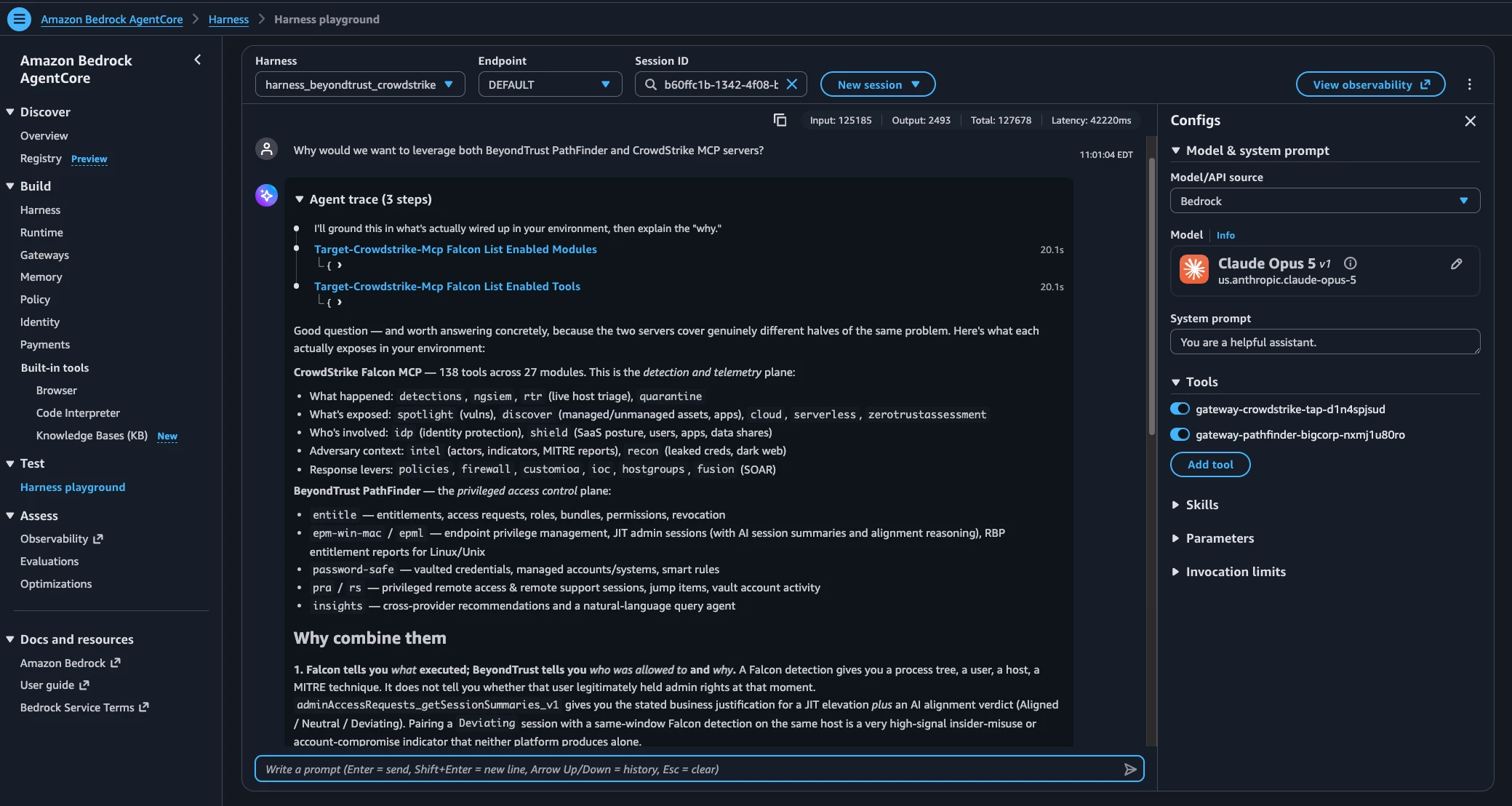
Wiring CrowdStrike Falcon and BeyondTrust Pathfinder into a single conversational agent on Amazon Bedrock AgentCore
Why We Built This
BeyondTrust and CrowdStrike both ship native Model Context Protocol (MCP) servers: Pathfinder MCP for identity and privilege data, Falcon MCP for detections and threat telemetry. Used separately, each lets an AI agent query one platform. Wired together behind a single conversational agent, they let a security analyst ask one question and get an answer that spans both platforms — for example, whether an identity's privilege exposure lines up with what's actually happening on the detection side.
This guide walks through how we built exactly that on Amazon Bedrock AgentCore, using Claude as the reasoning model. It documents every real snag we hit, because the snags are where the actual learning is.
Architecture at a Glance
- One Harness (a Bedrock AgentCore conversational agent, running Claude) with two tools attached.
- Each tool is an AgentCore Gateway, which aggregates one platform's MCP server into a single unified virtual MCP endpoint.
- gateway-crowdstrike → one MCP server target → an AgentCore Runtime hosting the open-source Falcon MCP server container.
- gateway-pathfinder → one MCP server target → BeyondTrust's hosted Pathfinder MCP endpoint.
Three distinct authentication hops sit inside this chain, each with its own auth type. Getting these three right is most of the work — see Part 6.
Prerequisites
- An AWS account with access to Amazon Bedrock AgentCore (Build → Runtime, Gateways, Harness, Identity).
- An Anthropic Claude model enabled in Bedrock. Model access now auto-enables on first invocation; first-time use of an Anthropic model may prompt for use-case details.
- CrowdStrike Falcon API client credentials (Client ID / Secret) with the scopes your demo needs — Detections: Read at minimum, plus NGSIEM:write if you need underlying event detail (see Part 8).
- BeyondTrust Pathfinder API credentials for the modules you want to expose (Identity Security Insights, Password Safe, PRA/RS, EPM, Entitle, etc.).
- Comfort editing IAM policies — you'll do it more than once.
Part 1 — Deploy the CrowdStrike Falcon MCP Server to AgentCore Runtime
The Falcon MCP server is a translator: it speaks MCP on one side and calls the Falcon REST API on the other, authenticating with OAuth2 client credentials under the hood.
Deploy it as a container via CrowdStrike's own Bedrock deployment guide, or manually through AgentCore → Build → Runtime → Create, pointing at the falcon-mcp container image and setting FALCON_CLIENT_ID, FALCON_CLIENT_SECRET, and FALCON_BASE_URL as environment variables.
Common mistake: pointing a Gateway target directly at CrowdStrike's real API domain (e.g. api.us-2.crowdstrike.com) instead of at the Runtime's own MCP endpoint. Falcon's REST API doesn't speak MCP — you'll get an HTTP 404 on the Gateway's “initialize” handshake if you try.
Once deployed, test the Runtime directly from its own console “Test” pane — call a connectivity check and a real search tool — before wiring it into anything else. Confirming the Falcon credentials work in isolation saves a lot of time later.
Part 2 — Authenticate the Gateway to the Runtime
This is the step that burns the most time if skipped: find out whether the Runtime's inbound authorization is IAM (SigV4) or OAuth (Custom JWT) before building anything downstream of it.
aws bedrock-agentcore-control get-agent-runtime \ --agent-runtime-id <RUNTIME_ID> --region <REGION> --no-cli-pager
Look at the authorizerConfiguration field in the response. If it shows customJWTAuthorizer (commonly backed by a Cognito user pool, since several deployment guides scaffold one automatically), IAM/SigV4 outbound auth on the Gateway target will never work — not because of a missing permission, but because it's the wrong protocol entirely.
Building the OAuth path
- In the Cognito user pool referenced by the discoveryUrl, create a new App Client of type “Machine-to-machine application” — not the default “Traditional web application” type most quickstarts create. Those are built for username/password login and can't be retrofitted with a client secret after the fact.
- Cognito auto-generates a domain, a default resource server, and a custom scope (default-m2m-resource-server/read) for M2M clients. Note the new Client ID and secret.
- Add the new client ID to the Runtime's allowedClients list via update-agent-runtime. This API replaces the full runtime spec rather than patching it — re-supply the role ARN, container URI, network and protocol configuration, and environment variables alongside the updated authorizerConfiguration.
- In AgentCore Identity → Outbound Auth, create a Custom OAuth2 provider using the Discovery URL configuration method (Cognito publishes one, unlike some vendor APIs) with the new Client ID, secret, and Client Credentials grant type.
- On the Gateway target, set outbound auth to OAuth client, select that provider, grant type Client Credentials, and the scope from step 2.
Part 3 — Build the CrowdStrike Gateway
- Create a Gateway with protocol type MCP. Inbound auth: IAM is fine here — it governs how your Harness calls the Gateway, a separate hop from how the Gateway calls the Runtime.
- Add a target of type MCP server, not “AgentCore runtime” target type — that type is a raw passthrough with no tool aggregation, which defeats the point of merging two platforms into one toolset.
- MCP endpoint URL is the Runtime's invocation URL: https://bedrock-agentcore.<region>.amazonaws.com/runtimes/<URL-encoded-runtime-ARN>/invocations?qualifier=DEFAULT
- Outbound auth: OAuth client → the Cognito M2M provider from Part 2.
- Passthrough setting: “Do not use passthrough – default aggregated.” This is what merges the target's tools into the Gateway's single virtual MCP server; “Passthrough – advanced” skips aggregation entirely.
- Sync the target and confirm status Ready.
Part 4 — Build the BeyondTrust Pathfinder Gateway
Same pattern: create a Gateway, then add an MCP server target pointing at BeyondTrust's Pathfinder MCP endpoint.
BeyondTrust's Pathfinder MCP server authenticates with a static API key rather than OAuth. Use the API key outbound auth type, backed by an AgentCore Identity API key credential provider holding your Pathfinder API key. Aggregation setting is the same as Part 3.
Part 5 — The Tool-Name Collision (and How to Avoid It)
BeyondTrust's Pathfinder MCP server exposes roughly 95 tools across modules — Entitle, EPM, EPML, Insights, Password Safe, Platform, PRA, and RS. When a Gateway builds a fully-qualified tool name, it combines target name + module + tool name.
If the target name is long, some tool families collide. Both PRA and RS expose a getVaultaccountactivityBy-* family with three variants (end-date-duration, start-date-duration, start-time-duration) sharing an unusually long common prefix. Combine that with a verbose target name and the fully-qualified name can exceed common tool-name length limits — many LLM tool-calling schemas cap function names around 64 characters — so the differentiating suffix gets truncated away and all three variants collapse onto the same registered name. Loading then fails with “Cannot register tools with exact same name.”
Fix: keep target names short. Renaming a verbose target (e.g., target-pathfinder-bigcorp) to something compact (e.g., BTPF) reclaims enough characters to keep every tool name's differentiating suffix inside the surviving, un-truncated portion of the string.
If a rename isn't practical, the fallback is excluding the redundant operations via tool filtering on the target.
Part 6 — The IAM Hops You Need to Get Right
Three separate hops in this chain each need their own authorization, plus one easy-to-miss fourth item:
| Hop | What it governs | Fix |
| Harness → Gateway | The Harness calling each Gateway | bedrock-agentcore:InvokeGateway on the Harness's execution role, scoped to each Gateway ARN |
| Gateway → Runtime (CrowdStrike) | The Gateway calling the Falcon MCP Runtime | OAuth client-credentials (Part 2) — not an IAM action at all |
| Gateway → Token Vault (BeyondTrust) | Fetching the stored Pathfinder API key | bedrock-agentcore:GetResourceApiKey and secretsmanager:GetSecretValue on the Gateway's service role, scoped to the exact credential-provider ARN and its Secrets Manager secret |
| Harness → Bedrock model (first call only) | Anthropic's one-time Marketplace subscription check | aws-marketplace:ViewSubscriptions and aws-marketplace:Subscribe on the Harness's execution role |
Watch for stale resource references: it's easy to copy an ARN from an older or different credential provider or gateway (e.g., one auto-created months earlier by a quickstart flow) instead of the one your current target actually uses. Read error messages for the exact resource name, not just the resource type.
Part 7 — Build the Conversational Harness
- Create a Harness. Model/API source: Bedrock. Pick a Claude model.
- Add both Gateways as tools (type: Gateway). Outbound auth: IAM role for each — this is the Harness → Gateway hop from Part 6.
- Write a system prompt that names the tools explicitly and instructs the model to use them directly. A generic “You are a helpful assistant” prompt can lead the model to explore via built-in Shell or Code Interpreter tools instead of calling your MCP gateways — spell out that it should always call the named gateway tools for identity, privilege, and detection questions, and should not use shell commands to “discover” what's available.
- Start a fresh session any time you change the tool list. AgentCore sessions bind their tool schema at creation time — adding tools to a Harness config does not retroactively reach an already-running session.
Part 8 — Test It End to End
Use a prompt that forces the agent to touch both platforms in a single turn, for example:
“Show me any CrowdStrike detections related to BeyondTrust Password Safe access group changes, and tell me if the affected accounts have a mapped Path to Privilege.”
A well-built agent should refuse to fabricate an answer when a tool is unavailable or a credential is broken, rather than guess. Treat that refusal as a diagnostic, not a bug — the specific error it surfaces (a specific 403, a specific missing scope) is usually the fastest path to the actual fix.
One scope commonly missing on the CrowdStrike side: NGSIEM:write on the Falcon API client. CrowdStrike's NG-SIEM/LogScale-backed search API requires this scope even for read-only queries — without it, the agent can see detection records but can't pull the underlying event detail (for example, which accounts were actually added to which groups).
Troubleshooting Cheat Sheet
| Symptom | Likely cause | Fix |
| 404 on Gateway “initialize” handshake | Target URL points at the platform's raw REST API, not an actual MCP endpoint | Point the target at the MCP server's real invocation URL |
| “Authorization error when sending message” | Outbound auth type doesn't match the target's real inbound requirement (IAM vs OAuth/JWT) | Check the target's actual auth type (get-agent-runtime) before choosing an outbound auth type |
| 403 — “no identity-based policy allows the action” | Missing or misscoped IAM permission on the calling role | Add the specific action and exact resource ARN; confirm it's not a stale/older resource |
| “Cannot register tools with exact same name” | Fully-qualified tool name exceeds a length limit and truncates to a duplicate | Shorten the target name, or filter out the redundant tool |
| Model explores via Shell instead of calling your tools | Generic system prompt gives no steer toward the configured tools | Name the tools explicitly in the system prompt; instruct against shell exploration |
| Tools “missing” from a session that should have them | Session bound its tool schema before the tool was added to the Harness | Start a genuinely new session |
| Marketplace AccessDeniedException on first model call | Anthropic models on Bedrock require a one-time Marketplace subscription | Add aws-marketplace:ViewSubscriptions / Subscribe to the calling role |