Question

TAP configuration option in non TAP workstyles

  • February 20, 2026
  • 1 reply
  • 70 views

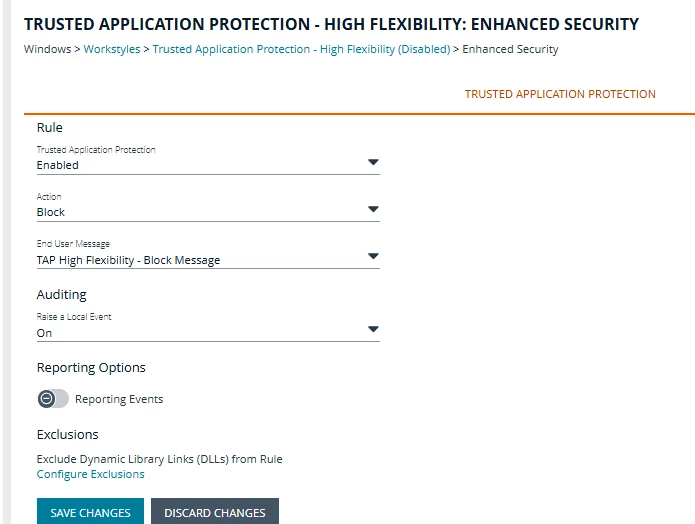
I understand that to implement TAP you add the TAP High Flex or High Security workstyles but what is this option in all workstyles:

And given that specific rules block or allow and audit, what does this do?
TIA


1 reply

  • BeyondTrust Employee
  • February 24, 2026

Hey ​@brownbag, good question.

You are correct that this is separate from the Trusted Application Protection (TAP) workstyle templates that can be leveraged in policy.


The section in your screenshot (available under “Enhanced Security” for any workstyle) is one of two options which provides the ability to passively allow or block DLLs (the other option being in the “Microsoft Block Rules” tab). 


This TAP configuration provides user-application hardening by enforcing protection on a specific list of trusted applications. Apps like email, the Microsoft office suite, Adobe, etc. are all notable entry points for malware to execute a payload from. By enabling this protection, EPM can block these from running alongside these trusted applications. In other words, the goal of TAP DLL protection is to prevent all untrusted DLLs from being loaded by a hardcoded list of productivity applications.


For more information, please see: (KB0019881) How to manage DLLs with Endpoint Privilege Management for Windows