
Solved

Directory accounts linked to Oracle databases

  • February 19, 2026
  • 2 replies
  • 43 views

Hello everyone,


Is there any way to filter the linking of domain accounts in Oracle databases?

In my environment, I have some accounts that are linked to Windows servers. However, this link is extending to Oracle databases located on these same servers.

So when I go to Password Safe > Directory Linked Accounts and filter by the server in question, the credentials appear duplicated, pointing to the Server system and the Database system.

We don't use these domain accounts to access the Oracle databases, and I understand that this link is being replicated by the smart rule created for linking the accounts to the server only.


This is also causing me problems with the Secret Cache replication, which is collecting the passwords of these accounts and registering the database as the System, and not the System I registered for these accounts to be linked.


Regards,

Rudolf.
Best answer by jchandler

Hello ​@rgkessel 

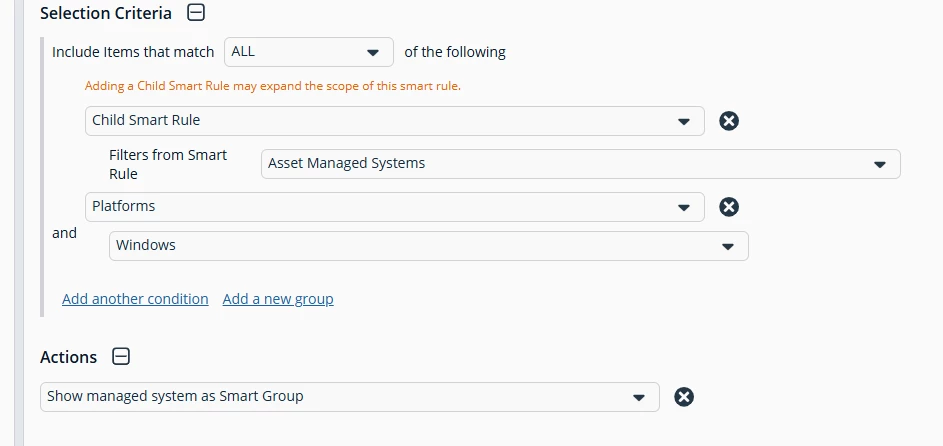
You could filter out your Oracle Managed Systems by creating a Managed System smart rule similar to this. 

If you choose an Asset based smart rule that has your Windows Servers with Oracle databases and filter the rull to only return the Windows platform. 

Then use this rule in your rule linking rule.

If you have any questions on this please let me know.

Regards,

John

2 replies

  • BeyondTrust Employee
  • Answer
  • March 2, 2026

Hello ​@rgkessel 

You could filter out your Oracle Managed Systems by creating a Managed System smart rule similar to this. 

If you choose an Asset based smart rule that has your Windows Servers with Oracle databases and filter the rull to only return the Windows platform. 

Then use this rule in your rule linking rule.

If you have any questions on this please let me know.

Regards,

John


  • Author
  • Rising Star
  • March 2, 2026

Hello ​@jchandler,


I made some changes that seem to have taken effect.


As you instructed, I created a Managed System smart rule with the criteria below, changing only the Child Smart Rule to Asset Smart Group (that cames from a Address Group) > I added the smart group > Added the platform:


Then, in the Managed Account smart rule, I changed the account link by removing the smart group and asset and adding the Managed System smart group that I created:


And apparently... success! The account no longer appears as linked on the Oracle platform:


Thank you for the tip.

I will monitor this during the week and also check if the Secrets Cache corrects the System that the account is linked to.

If everything goes well, I will change the other smart rules of managed accounts that are being linked to the Oracle databases.


BR,

Rudolf.




