Trailblazer
March 4, 2025

How to see domain login option for BeyondInsight

  • March 4, 2025
  • 8 replies
  • 225 views

Hello Everyone,

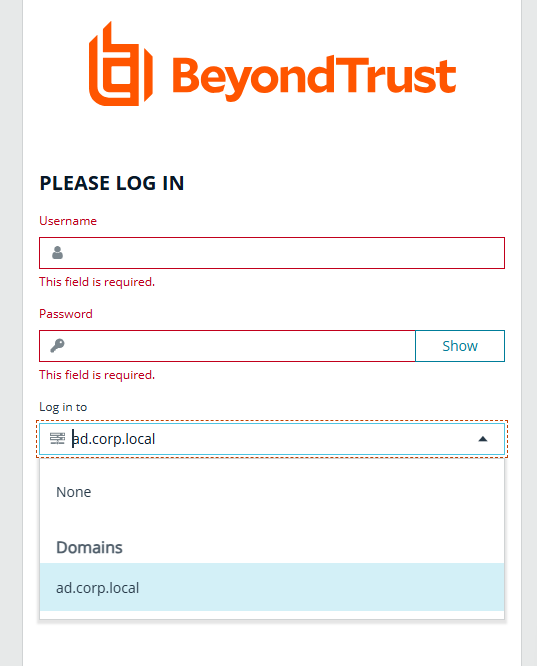
I was looking for reference to enable domain login for BeyondInsight. (like screen below). We have directory credentials account working fine. I tried by creating new domain in domain management but still I could only see UserName and Password field on login screen. I am looking for that third field “Log in to” with domain name in that as option.


    8 replies

    mcencienzo
    Trailblazer
    March 5, 2025

    Hi Prasad,


    You need to enable the option by navigating to Configuration > System > Site Options. On the Site Options, you will see that there’s a configuration under Login Page, wherein you need to enable the Show list of domains/LDAP servers on login page. You may use the screenshot below:

    Once enabled, click Update Login Page Options, and try to login again.


    Hope it works. :)

    ~ Mackey
    prasadp87Author
    Trailblazer
    March 5, 2025

    Hi Mcencienzo,


    Thank for your reply!! I do have that setting enabled but still I cant see the domain name list on login page. Here is the screenshot of setting for me. Not sure what is wrong here :( 


    mcencienzo
    Trailblazer
    March 5, 2025

    Hi Prasad,


    Have you already added domain user accounts on User Management? Can you try this out first since you already have Directory Credential working. Also, enable the User Group Resolution for the Directory Credential.


    Hope it works. :)

    ~ Mackey
    prasadp87Author
    Trailblazer
    March 5, 2025

    Hi Mcencienzo,

    Thanks for response and suggestion!!

    By adding domain user account on User Management, it start showing up.


    prasadp87Author
    Trailblazer
    March 6, 2025

    Hi Mcencienzo,

    I have related question about this topic, I could able to see the dropdown option for domains. But when I try to login with the domain credentials it fails with invalid credentials. Are there any other settings that need to be checked.

    I have Domain group with enabled features assigned to my account, but it's showing as “Group not provisioned” is that could be the reason behind?


    mcencienzo
    Trailblazer
    March 7, 2025

    Hi Prasad,


    You need to add permission on your group first before the user on that group can login to Password Safe. Either you can assign a feature or Smart Groups specific to a role (Requestor, Approver, ISA, Auditor or Session Viewer)

    ~ Mackey
    GloriaB
    BeyondTrust Employee
    BeyondTrust Employee
    March 11, 2025

    @prasadp87 This error can occur if there is no Smart group assigned to the group or if the Password Safe role is not set.  Have a look at the video in https://beyondtrustcorp.service-now.com/csm?id=kb_article_view&sysparm_article=KB0017298

    and 

    https://beyondtrustcorp.service-now.com/csm?id=kb_article_view&sysparm_article=KB0019919


    prasadp87Author
    Trailblazer
    March 12, 2025

    Hey Everyone,


    Thanks for your quick replies and providing different solutions. I could be able to resolve this issue and now domain login is working fine with smart group assigned.


    Thanks,

    Prasad