

Question

How to use same application but with multiple Functional Account

  • January 27, 2026
  • 6 replies
  • 41 views

raymondus
Forum|alt.badge.img+7

Hello teams,

I have a case like this:

There is an application, let’s call it data_input.exe that installed in my RDS Jumphost server.

Two users need to login this application using their own managed accounts (this is done using automation).
However, I need both users to launch the application under different functional accounts within the same RDS jump host. For example, person A start the jumphost using FA-1, and person B start the jumphost using FA-2.

Is BeyondTrust able to support this type of scenario? Or is there a workaround for this kind of scenario?

I tried cloning the data_input.exe application in the BeyondTrust configuration, but it appears that only one functional account can be assigned per managed system.
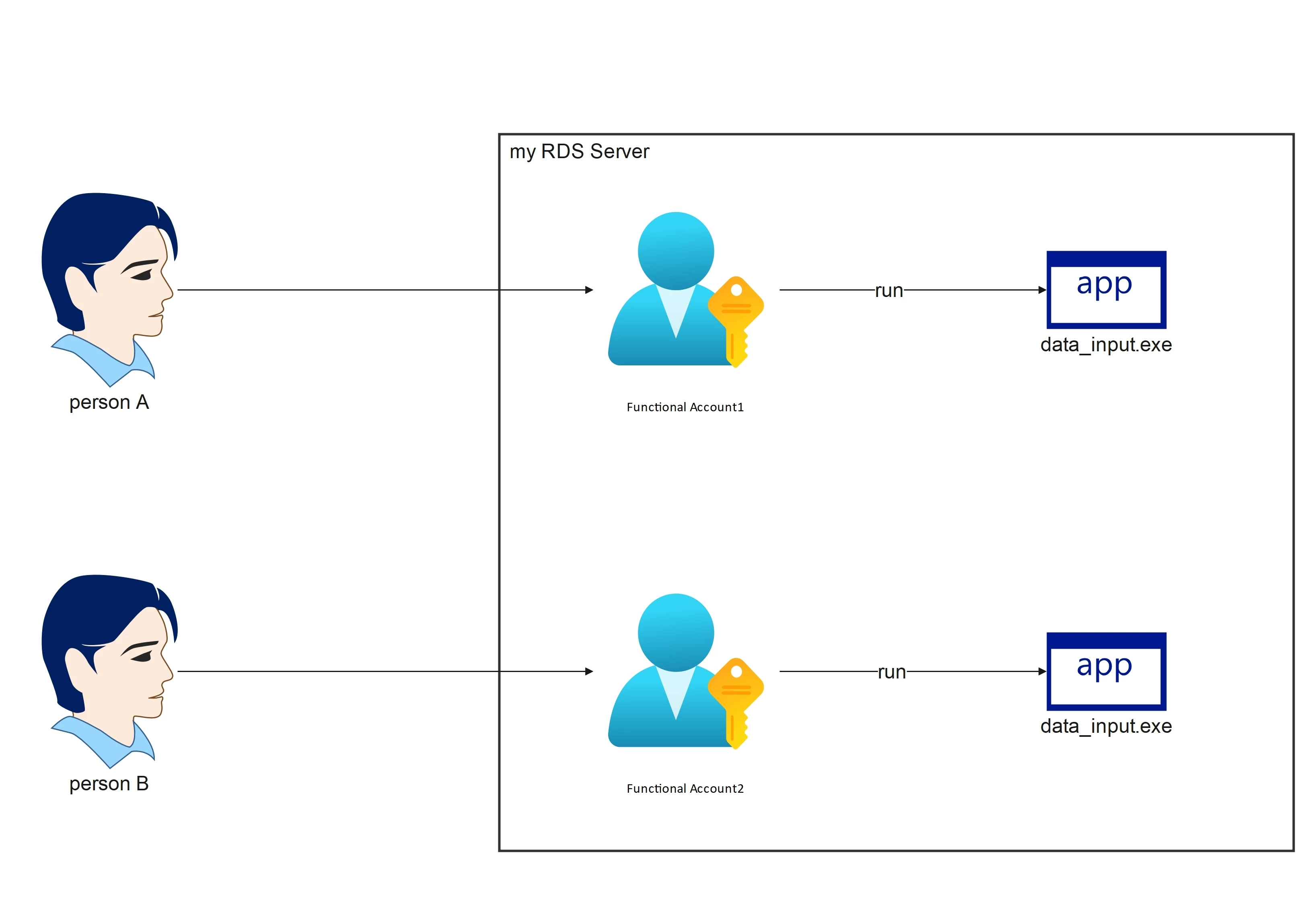
 

Note: This is not a multi-session issue, i can do multisession already. But more like each functional account must have different privileges for specific reasons.


Thank you

 

6 replies

  • BeyondTrust Employee
  • January 28, 2026

Hello ​@raymondus 

You cannot use one application with 2 different functional accounts but I think we can get the required results.

With an Password Safe application you can control what user launches the application. It can be a FA account or a Managed Account.

If you need the application to launch as 2 or more users you can use Managed Accounts. Local or Domain.

If you want to use local accounts create 2 new local accounts on your RDS server with the required permissions and onboard these accounts as local accounts on your RDS Managed System.

In your application set these applications to run on the current system.


Then the new local accounts and link to your application.


  • BeyondTrust Employee
  • January 28, 2026

If you are using Domain Accounts link the domain accounts to your RDS server.

Note: If the domain accounts are linked to any other managed systems they will show up as applications as well by default by you can restrict to only your RDS server/s by creating a Managed System smart rule that only returns your RDS server/s and setting the smart rule under “Domain Linked account Behavior” section.


  • BeyondTrust Employee
  • January 28, 2026

If you have any questions please let me know.


raymondus
Forum|alt.badge.img+7
  • Author
  • Rising Star
  • January 29, 2026

If you have any questions please let me know.

Hi ​@jchandler , thanks for the solution

For the run application as managed account solution, I’ve tried it.
However, this data_input.exe application has another managed account whose credentials need to be injected to the login interface via automation script (credential auto-inject is already working).
So, to run data_input.exe, there are two accounts involved:

  1. Dedicated RDS account (used to log in to RDS and launch data_input.exe, this is a mapped RDS account)
  2. Dedicated application account (injected so the app can auto-login to data_input.exe, this is a local app account, created inside the app, not an LDAP or other IDP, non-rotatable)

It seems this application is a legacy app that has been operating with this mechanism for many years.
One employee needs one Windows RDS account and one application account, and this Windows RDS account is not a regular employee account but more like a mapped account (like employee1_rds, employee2_rds, etc).


This mechanism is related to user profiles that must be separated per employee. The application cannot be configured to use a custom user profile directory, for example like:
“.\data_input.exe userProfileDir=c:\myCustomPath_forEmployee1\”

Another reason appears to be related to user privileges, where inside this RDS server, there are different shared folder paths for each employee (used for importing/exporting data into the application).

Note:

  • We only have one RDS server for everyone, so it can’t be one dedicated RDS machine for one employee.
  • I avoid using API calls method (if it’s somehow possible to use an API call to inject the app credential while in RDS managed account session) because it would add complexity when maintenance / change is required.

Thanks


  • BeyondTrust Employee
  • January 29, 2026

Hello ​@raymondus 

What is this “data_input.exe” program? Is it a custom program or an AutoIT script that launches a browse or some other program. 


raymondus
Forum|alt.badge.img+7
  • Author
  • Rising Star
  • January 30, 2026

Hello ​@raymondus 

What is this “data_input.exe” program? Is it a custom program or an AutoIT script that launches a browse or some other program. 

Hi ​@jchandler 

The data_input.exe is a compiled autoIT script that launch the real .exe program and doing the auto-inject.

I cannot tell you what the exact program is because of NDA, but it’s a legacy program, quite old, and closed source, created by local 3rd party vendor.

The program is installed in C:\Program Files\ like a common program and we can’t change the install location. But every time someone launched this program, it will use the userProfile directory specific to the RDS user that launched it.
I asked the user whether, somehow, we could modify the source code or ask the developer to change it so that it could use a custom userProfile, but it seems that’s not gonna happen for some reason. 


To simulate the behavior, as far as I can imagine, the mechanism might be similar to dBeaver Community Edition (Free DB editor), which cannot be used with multiple instances under the same user.

If you run dbeaver.exe as employee1_rds and then create a new RDS session using the employee1_rds account as well (so there will be two separated employee1_rds session) and run dbeaver.exe, it will fail.

However, if you create a new RDS session using the employee2_rds account and run the application, the program will run.

It’s not exactly a 100% match like this, but the behavior is pretty close.



