

mcencienzo
Trailblazer
March 4, 2025
Solved

Issue: PS Automate - Chrome Browser not opening

  • March 4, 2025
  • 16 replies
  • 763 views

Hi Everyone,


Is there someone also experience browser not opening upon running PS_Automate using the latest Chrome Browser as of today? We are on BeyondInsight 24.2.0.1324 and uses Enhanced Utility Tool with the same version. I have deployed this on my RDS server last January and was able to work this out. But as of today, I built again a Windows Server 2022 with RDS role however as of the moment, the PS_Automate does not work. I have to test this again due to my colleagues reported that they couldn’t make it work on their environment and some of their implementations. See sample screenshot below:
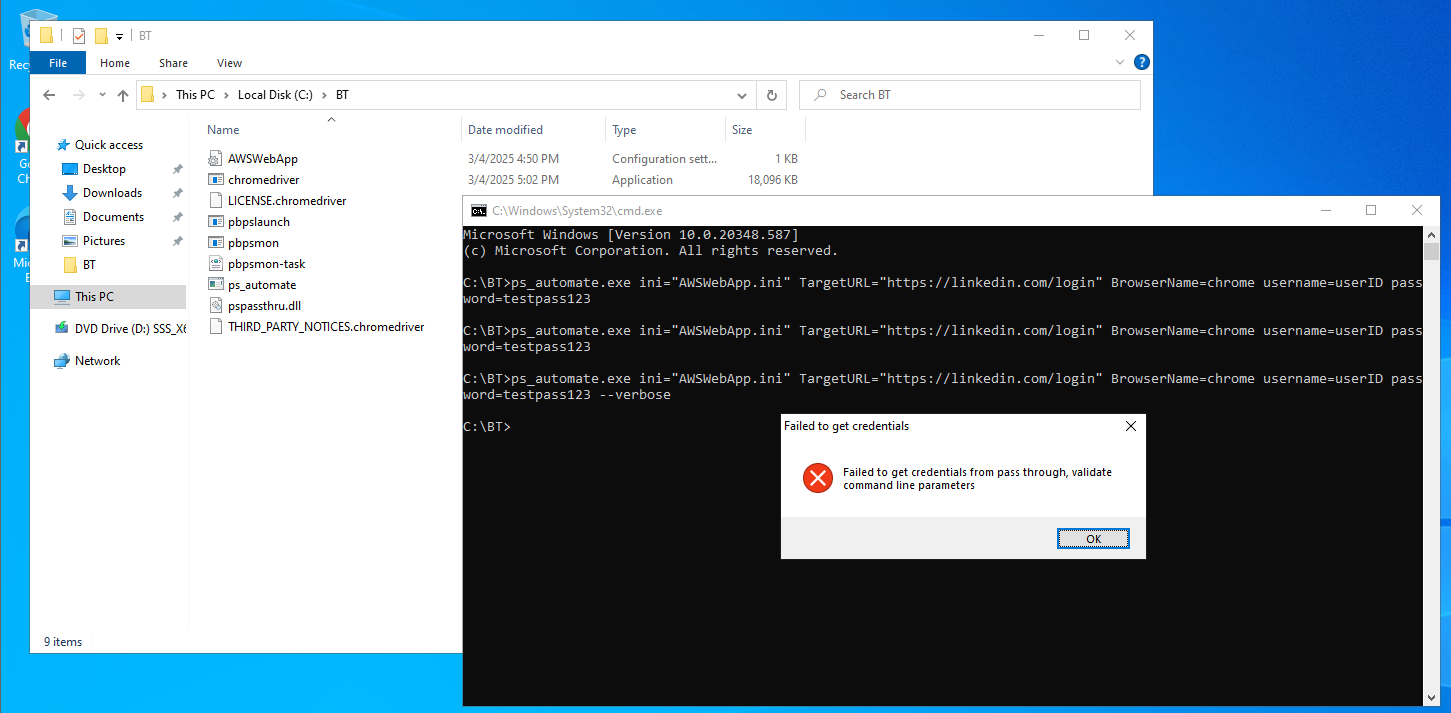
 

I can’t find any reliable KB articles to resolve this and I have already created a ticket support for this and unfortunately, the action items provided by the support is questionable and no certainty that it will work. 


Regards,

Fellow BCIE

Best answer by Prudhvi Keertipati

 Check the version of ps_automate file in the properties -> details tab because there is an issue with ps_automate in Enhanced Utility Tool 24.2.x.x

If version showing as 0.0.0.0 in details tab then try with different version of ps_automate. 


16 replies

frank.colvin
Veteran
September 12, 2025

we cannot use Mozilla as it is not acceptable for our organization.

Frank Colvin, Senior IT Administrator - PAM Intact Insurance Specialty Solutions
Veteran
September 12, 2025

what is the exact error? Is it blank page with data: ???

we cannot use Mozilla as it is not acceptable for our organization.


frank.colvin
Veteran
September 12, 2025

the web browser does not open, the logs indicate all is good but no browser window opens


Frank Colvin, Senior IT Administrator - PAM Intact Insurance Specialty Solutions
Veteran
September 12, 2025

does it launch msedge? You can open a case with the support, to provide you a version of ps_automate and .dll, that works to replace it in your installation. some of them are not working well.

frank.colvin
Veteran
September 12, 2025

no browser opens


Frank Colvin, Senior IT Administrator - PAM Intact Insurance Specialty Solutions
Veteran
September 12, 2025

Another think i did was to download recent version of enhance tool and install it, even on previous release. You are trying locally i gues? With example this one: ps_automate.exe ini="C:\Program Files\BeyondTrust\pbpsmon\AWSWebApp.ini" TargetURL="https://534949981440.signin.aws.amazon.com/console/" BrowserName="msedge" username="username" password="password"??