Solved
BeyondTrust Remote Support Customer Client - Repeated Screen Capture Permission Pop-ups on MacOS Tahoe
Hello, we recently started using BeyondTrust for our Intune-managed MacOS devices, and we have run into an issue with several of our users. They get 10-15 popups a day, saying "Remote Support Customer Client" is requesting to bypass the system private window picker and directly access your screen and audio. Screenshot here:
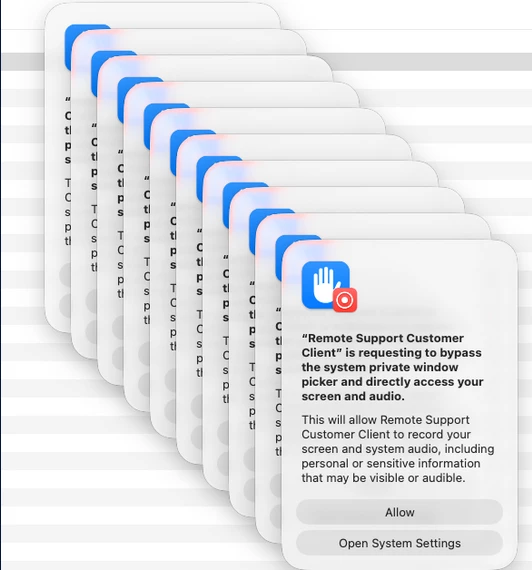
Here are the details.
Device:
- MacBook Pro (16-inch, 2024)
- MacOS Tahoe 26.3.2
- BeyondTrust Remote Support 25.3.1
Symptoms:
- Pop-ups happen all throughout the day, approximately 10-15 times daily, with no specific trigger.
- Even after pressing "Allow", the pop-ups continue to reappear.
- The Pop-ups have the following text:
- "Remote Support Customer Client" is requesting to bypass the system private window picker and directly access your screen and audio.
- This will allow Remote Support Customer Client to record your screen and system audio, including personal or sensitive information that may be visible or audible.
Troubleshooting steps:
- Tried turning the setting off and back on
- Tried Mac update to newest version
- Tried Uninstalling and Reinstalling BeyondTrust
- Attempted the following fix listed in this Support article:
- https://beekeepers.beyondtrust.com/general-45/remote-support-customer-client-pop-up-on-macos-15-sequoia-5552
- Ran the following command:
- sudo tccutil reset All com.bomgar.bomgar-scc
- Rebooted the device
- Walked user through reassigning permissions over the phone
- Created a PPPC configuration profile in Intune to give user admin access over Screen Capture permissions
Please let me know what else I can try. Nothing has worked so far.