Solved

Remote Support - Support Button - No Prompting User

  • July 22, 2026
  • 1 reply
  • 41 views

Is there a method to setting up the Support Buttons (or now call “standby Jump Clients”) to not prompt the user for any input when launching and send the session to a queue?

I’ve got as far as only one question asked before sending to the queue, but it’s one I can't figure out how to disable…
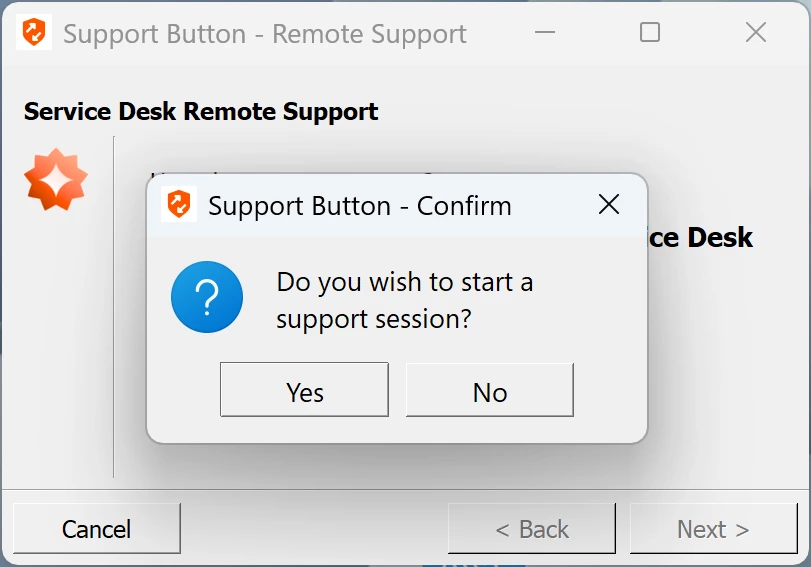
 

Annoying Message

If we can’t disable it, our thought is to keep it but allow access without end-user conformation.


Best answer by tdearman

Hi Bryce, support button sessions are customer initiated.  The message is simply confirming if the customer (user) would like to start a support session with a representative… there is no option to disable/modify the session start message, to my knowledge.


Prompting is actually from the rep side via session policy.  You can define the session policy if you would like the customer to be prompted or not.


Hope this helps.

Todd

1 reply

  • BeyondTrust Employee
  • Answer
  • July 24, 2026

Hi Bryce, support button sessions are customer initiated.  The message is simply confirming if the customer (user) would like to start a support session with a representative… there is no option to disable/modify the session start message, to my knowledge.


Prompting is actually from the rep side via session policy.  You can define the session policy if you would like the customer to be prompted or not.


Hope this helps.

Todd