
"Homebrew" category for community-built tools and add-ons (plus one I've built)
Most of us end up building small things around PRA: scripts, dashboards and automations that fill gaps the product doesn't cover. They usually live in private repos and we all solve the same problems separately. The Ideas portal is great for voting on features, but a feature can take a long time to arrive and many of us need something working now.
Wouldn’t it be great if there was
A dedicated category, perhaps Homebrew or Community Builds, separate from General, for sharing community-built tools, dashboards, integrations and workflows. It would be a place to show what you've built, get feedback, and collaborate on common gaps. Suggested ground rules:
- Everything is unofficial and unsupported, shared at your own risk.
- Mention the product and version you tested against.
- No secrets or customer data in posts or screenshots.
- Use least-privilege API accounts, and avoid giving Vault-key access to anything that doesn't need it.
- Link to the source where possible.
For BeyondTrust PRA, it would show which gaps people actually fill, and the most popular builds could become product features. It complements the Ideas portal: Ideas says what we want, Homebrew says what we're using in the meantime. I would love to see BeyondTrust staff create the category and take part.
An example: a concurrent license monitor (PRA)
The licensing problem we faced - this took me about 2 days to develop.
When the concurrent license limit is reached, the next person to log in is refused. In our experience that isn't recorded anywhere we could find, because the syslog only shows successful logins. The built-in license usage report is very limited, so we wanted to know who was refused, when, for how long, and how many licenses would have fixed it including the busiest times of the day and how often the platform gets used over the course of the week.
What I built
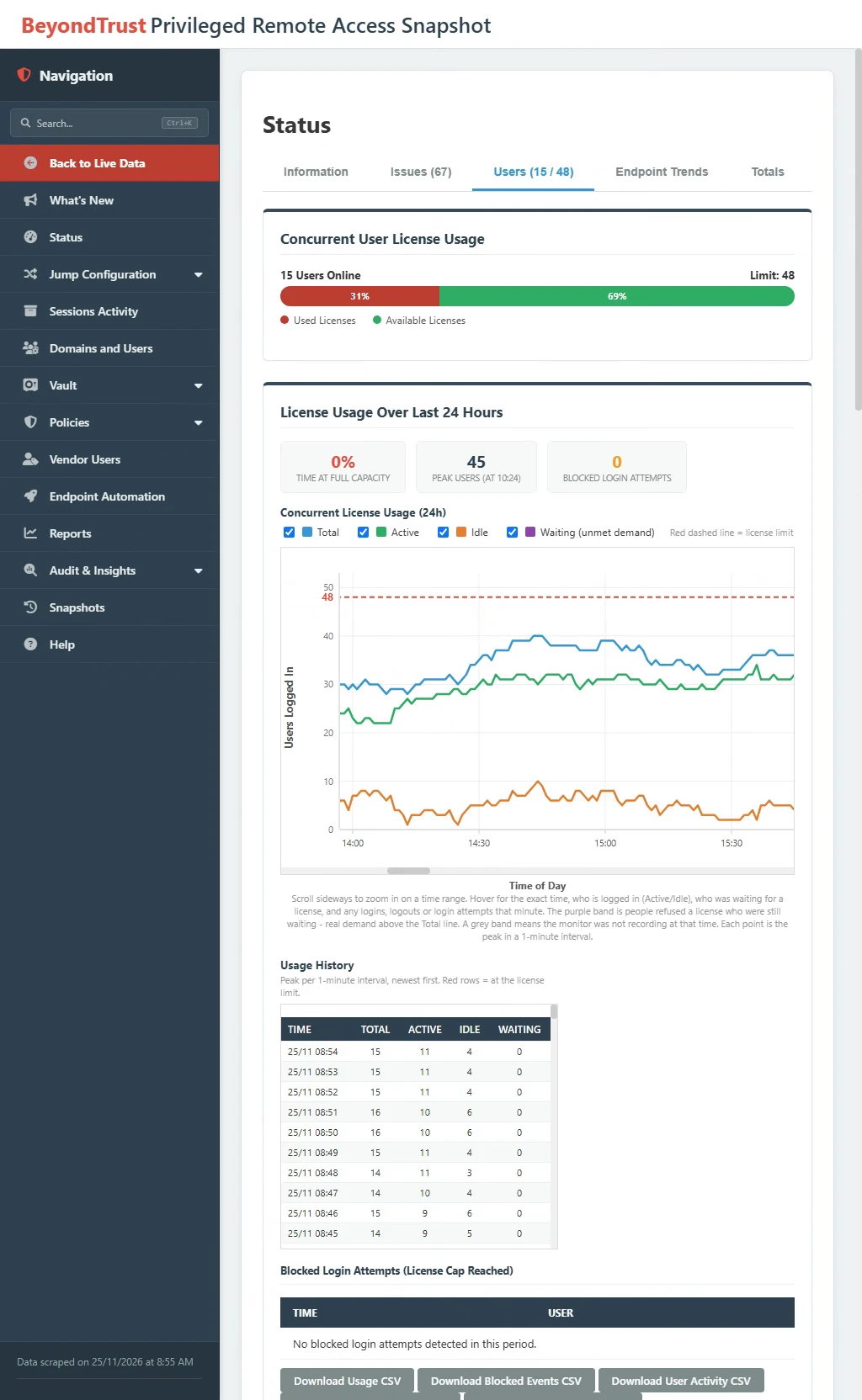
- Live sampling: a small PowerShell service checks who is logged in. It tracks total, active and idle users. An idle user still holds a license until they are logged out due to the inactivity setting.
- Blocked-login detection: it compares new logins in the syslog with the live list at that moment. If the list was full and the person never appeared, that's a refusal. Each one is tracked as an episode: first attempt, retries, how long they waited, and whether they got in or gave up.
- Planning views:
- A 24-hour chart with the limit line and a shaded "unmet demand" band for people waiting. We can then see if we need to order more licenses
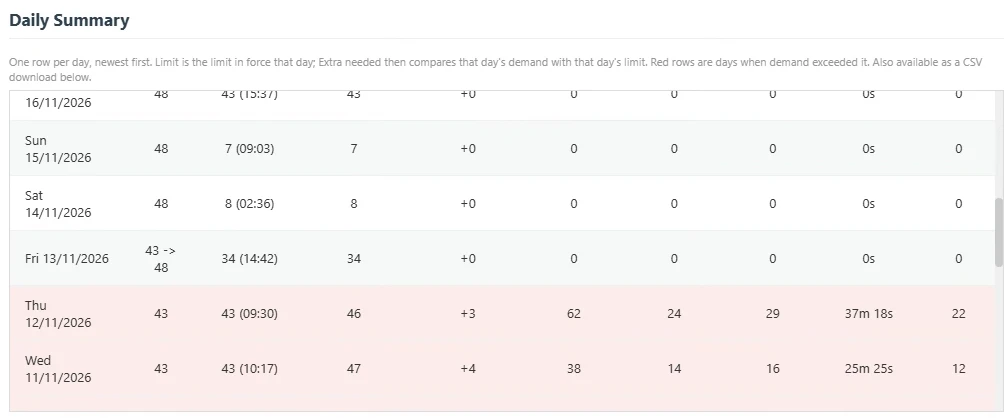
- A daily summary.
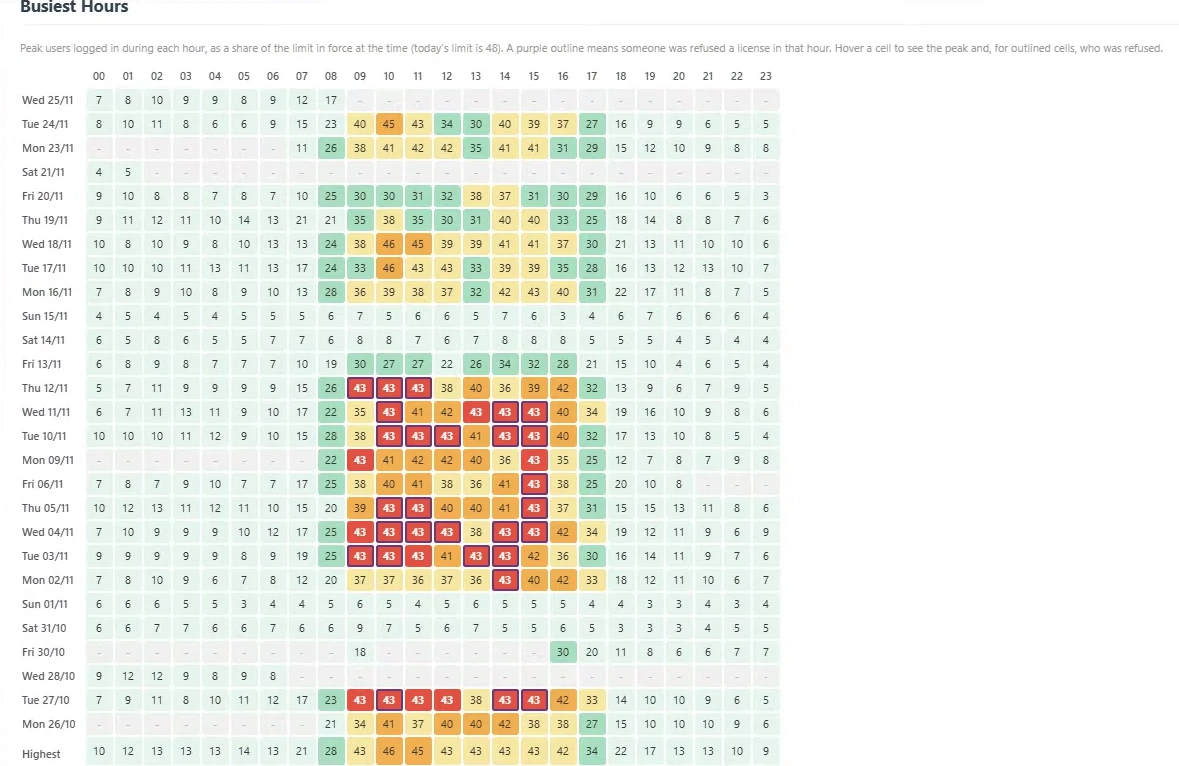
- A 30-day hour-by-day heatmap showing when you hit the cap, with a hover list of who was refused and if they waiting for a certain time before they were allowed a license.
- A "who is affected" table - shows the most frequent users who have issues getting a license so we could possibly take an action on these and automate an email to them to advise when a license is free.
- An estimate of how many extra licenses would have covered the peak point.
- A limit history, so past data is judged against the limit that applied at the time you bought more.
- Trust checks: it flags any gaps where the monitor wasn't recording, so a quiet stretch is never mistaken for "nobody was logged in".
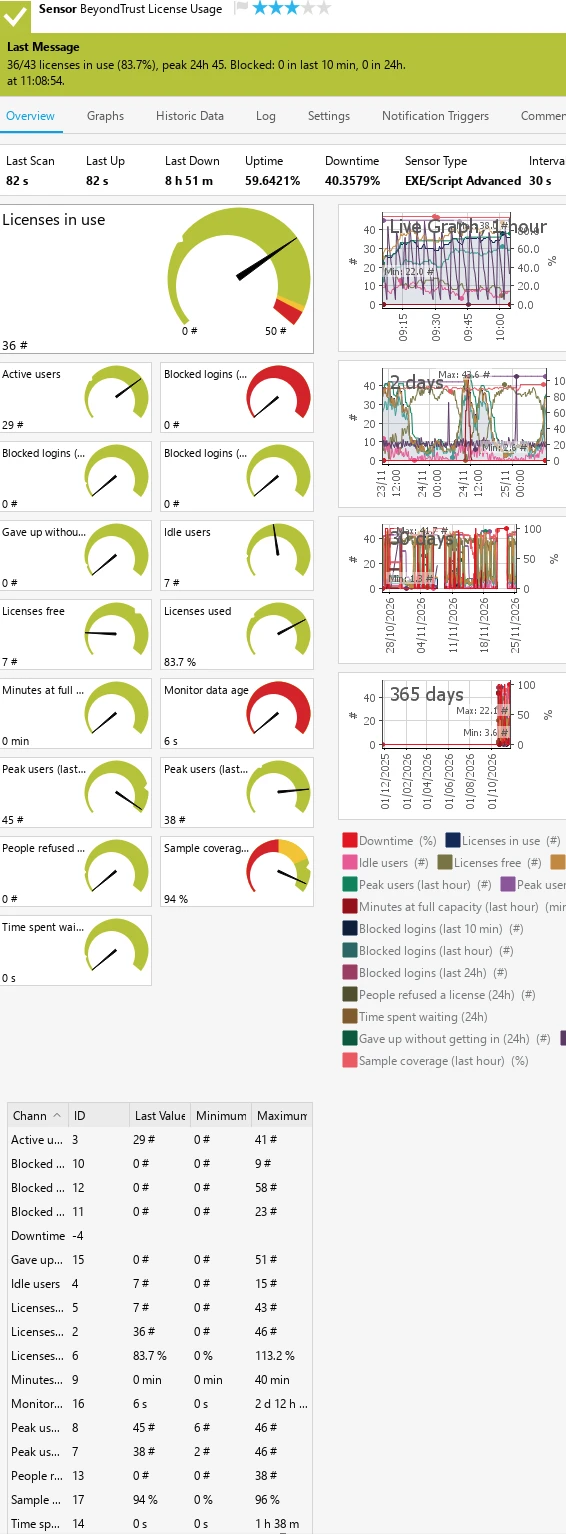
- PRTG sensor: We have integrated this to our monitoring platform so that it reads the monitor's data files directly, so nobody needs a BeyondTrust admin login or user license to see it. It alerts at 90% and 100% usage, on any refusal in the last 10 minutes, and when the monitor stops reporting.
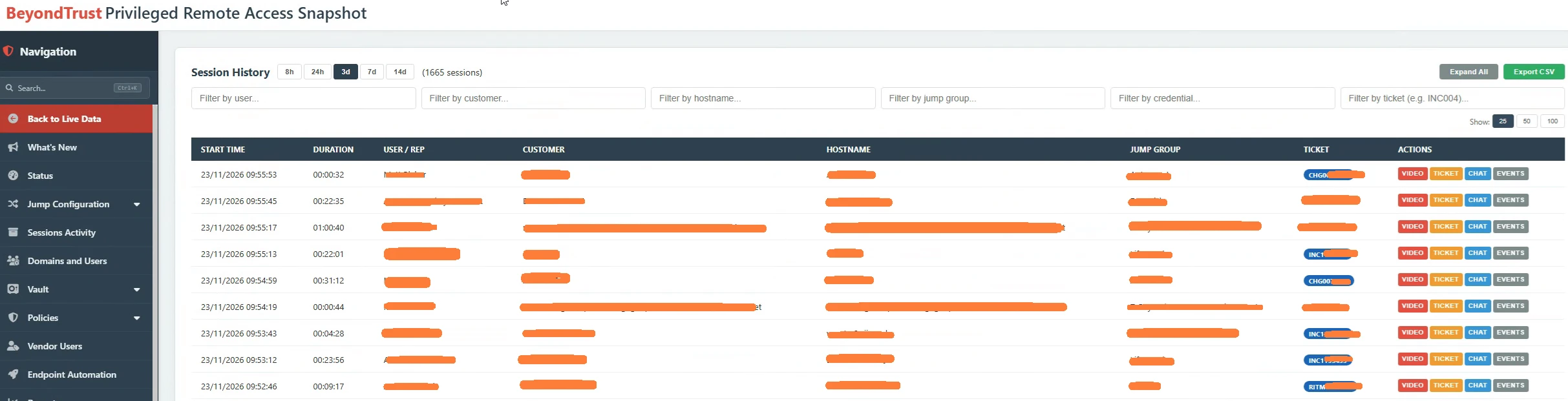
Other things Ive built: a read-only admin portal (Jump Item ID lookup, user audit, orphaned items, session activity, security provider export), an automated jump-item offboarding workflow with a verify-then-delete safety step writing details of the deletion and configuration for the item that was deleted back into Service NOW so that it could be recreated in the event, and an automated configuration backup with password-protected files whenever change is made to the configuration.
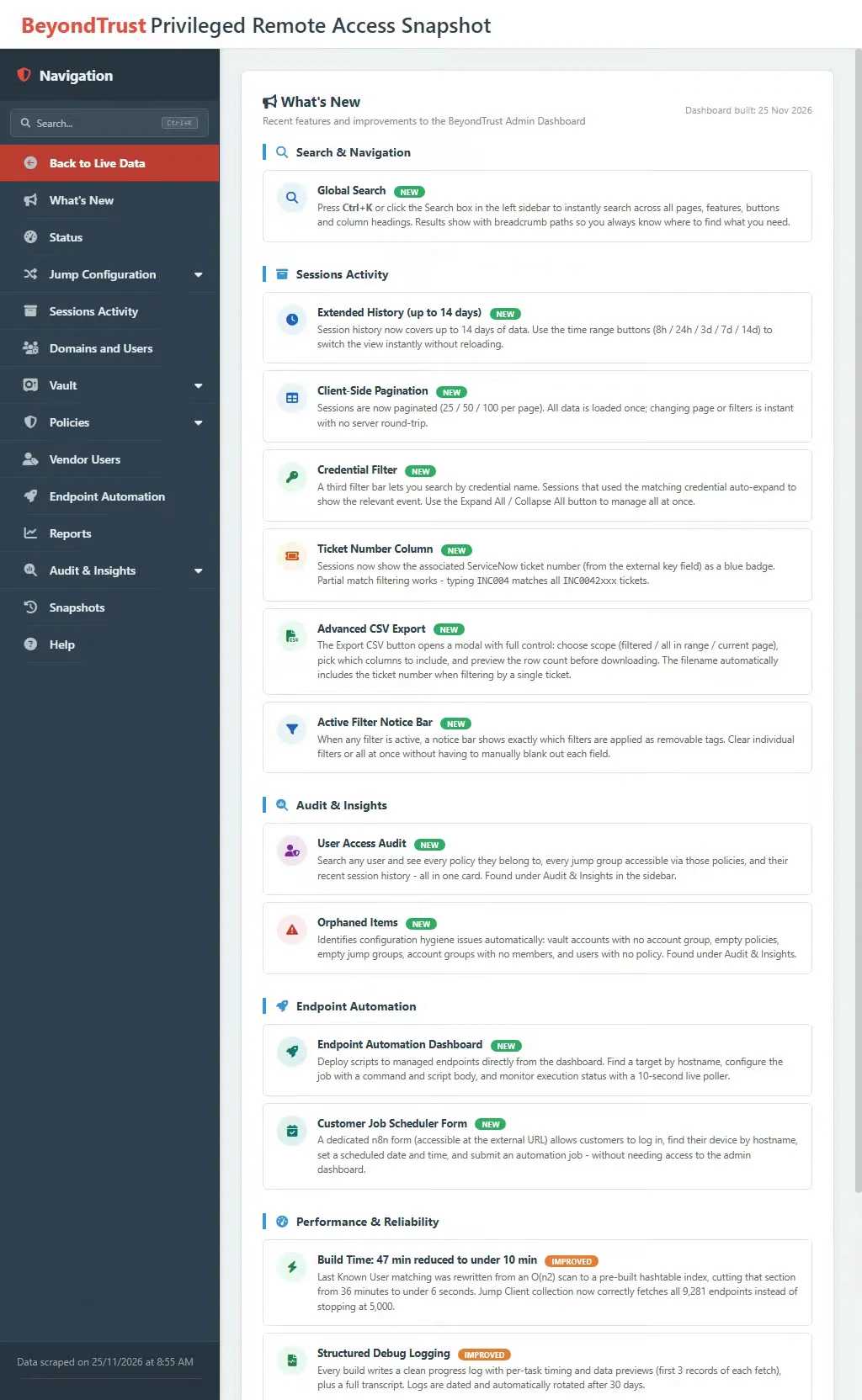
We've also got a snapshots section which gives us the ability to look back at the whole portal exactly as it was on an earlier date. Each snapshot is a complete, frozen, read-only copy of every page and its data, listed by date on a Snapshots page. Opening one shows the portal as it was at that moment, with a clear "you are viewing a static backup" banner and a one-click way back to live data. It lets us:
- answer audit questions about a past date, such as who had access to what on a given day, which the live console can't tell us;
- work out what changed between two dates, by looking at the same page in two snapshots;
- prove that a jump item existed, and what it was, after it has been deleted;
- hand an auditor or manager a dated read-only view without giving them access to the live system.
[Screenshot 1: license usage chart]
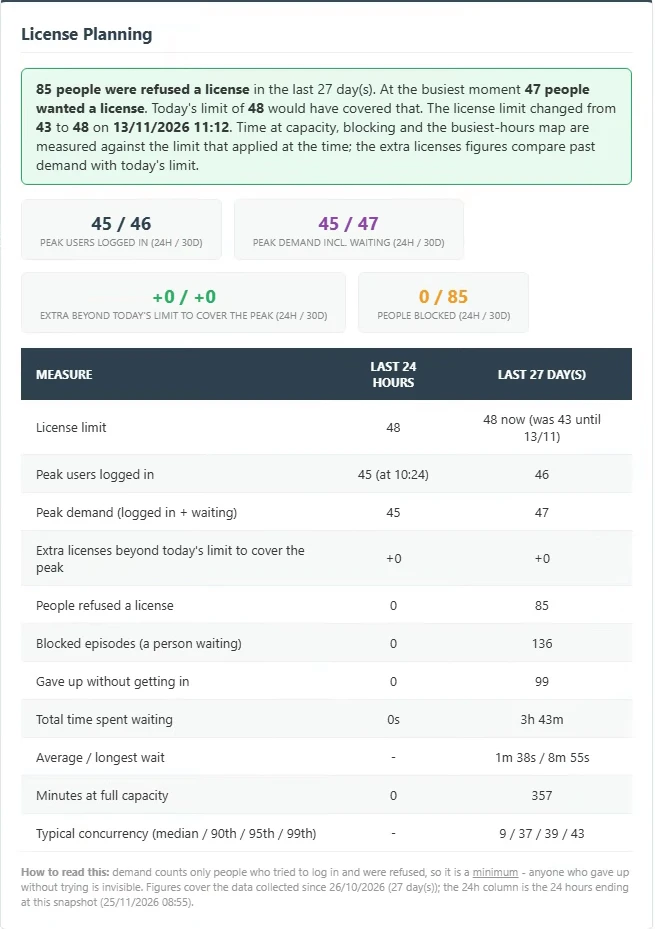
[Screenshot 2: Daily summary and busiest-hours heatmap]
[Screenshot 3: PRTG sensor]
[Screenshot 4: read-only portal]
I hope theres some interest in a Homebrew category if one is created as ive managed to fill in a lot of the beskpoke things we needed but would be good to see what other businesses face.