Solved

BeyondTrust EPM Windows & Mac SaaS Inquiry for Internal Product Evaluation

  • December 1, 2025
  • 2 replies
  • 73 views

Forum|alt.badge.img

Hi all,

Good day. I have a question regarding the EPM agent for macOS. For this test case, I have two types of endpoints, one Windows and one macOS.

I have learned about the agent installation for the Windows endpoint. This one is straightforward for my case since I only have one Windows endpoint for product evaluation. All I need to do is download the package manager and run the command to install it.

But, I am still unsure about macOS. Please note that Im not familiar with macOS and this is my first time working with it for a product evaluation. My question is, for macOS, can I use the same method for the agent installation? I mean using a package manager similar to the Windows endpoint since I only have a single macOS machine.

Appreciate it if someone could provide the proper guideline and advise on this.

Thanks again.
Best answer by Pulitros144

@Firdaus Jamaluddin 

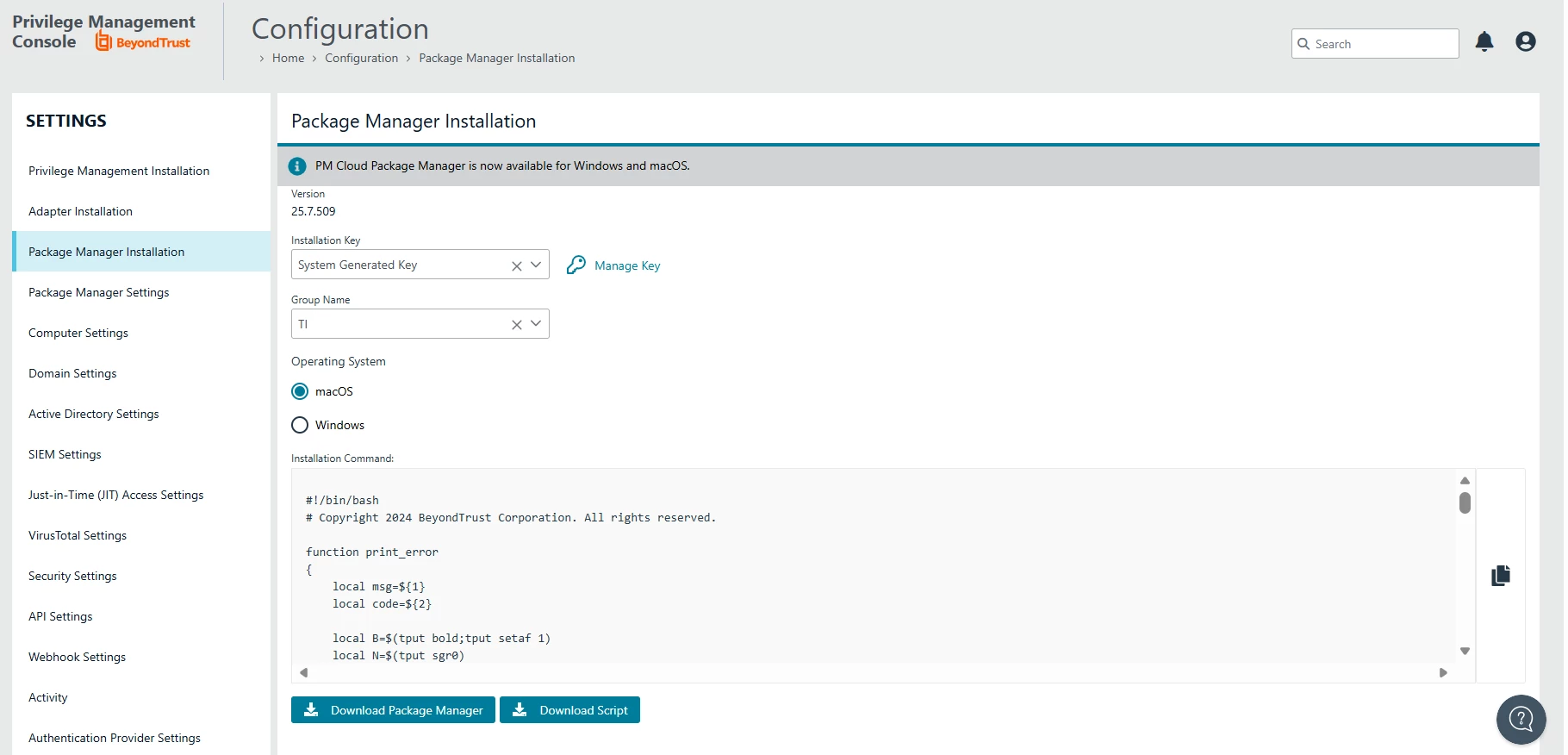
It's the same method; you can use the package manager on Mac as well. The only difference is that instead of just a command, you will run a script provided by the console. This script will set the variables that will be used for the package manager installation, and then you just run the install and it's done.

On the package manager download page, you have an option to change the OS (Operating System), and you can see the script I am talking about.

Make sure to select the 'Group Name' and the 'Installation Key', or the script will not be generated by the console for you to copy or download.


2 replies

Pulitros144
Forum|alt.badge.img+4
  • Veteran
  • Answer
  • December 1, 2025

@Firdaus Jamaluddin 

It's the same method; you can use the package manager on Mac as well. The only difference is that instead of just a command, you will run a script provided by the console. This script will set the variables that will be used for the package manager installation, and then you just run the install and it's done.

On the package manager download page, you have an option to change the OS (Operating System), and you can see the script I am talking about.

Make sure to select the 'Group Name' and the 'Installation Key', or the script will not be generated by the console for you to copy or download.


Forum|alt.badge.img

Hi ​@Pulitros144 , much appreciated for your response. I will try to install it later on. Thanks again.