
Josh Bristow
Veteran
October 30, 2024
Question

cloud adapter uninstall/ripper

  • October 30, 2024
  • 7 replies
  • 461 views

Has anyone encountered a case where the cloud adapter is not installed, but the service still shows in the services view. Attempting to install then generates the below error (Yes, I’m using the proper command line variables). I believe that artifacts still exist in the registry and it is causing this error. Is there a ripper tool available to completely remove older reg entries/files from previous installations? My alternative is to scour the registry and manually remove any reference to the cloud adapter.
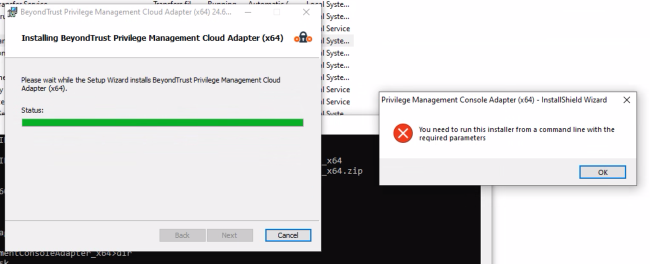

 

    7 replies

    Guru
    October 30, 2024

    Hey Josh.

    I don’t see all the details, but according to the error it only complains about the missing switches that is needed for the Console Adapter. You should be able to grab those from those from Configuration - Adapter Installation.

    The command line should look something like this.
    msiexec.exe /i "PrivilegeManagementConsoleAdapter_x64.msi" TENANTID="196b73a5-ba47-ef02-55e4-859e8355542e" INSTALLATIONID="InstallIDHere" INSTALLATIONKEY="InstallKeyHere" SERVICEURI="https://YourPMInstanceName-services.pm.beyondtrustcloud.com" GROUPID="GroupIDOfWhereTheGrouptheComputerShoudreside"

    The GroupID will only apply if this is the initial first install of the adapter.

    I have switch all my customers to use the package manager, it just makes it easier. Unfortunately you do run into odd machines that for some reasons have issues.

    You could use the Deployment Tool kit. it has some great tools to cleanup.
    https://psappdeploytoolkit.com/ everyone uses this for the same reason.

    Else it is a manual cleanup of registry, files and paths. maybe even a more detailed windows installer log.

    Josh Bristow
    Veteran
    October 30, 2024

    Hey Josh.

    I don’t see all the details, but according to the error it only complains about the missing switches that is needed for the Console Adapter. You should be able to grab those from those from Configuration - Adapter Installation.

    The command line should look something like this.
    msiexec.exe /i "PrivilegeManagementConsoleAdapter_x64.msi" TENANTID="196b73a5-ba47-ef02-55e4-859e8355542e" INSTALLATIONID="InstallIDHere" INSTALLATIONKEY="InstallKeyHere" SERVICEURI="https://YourPMInstanceName-services.pm.beyondtrustcloud.com" GROUPID="GroupIDOfWhereTheGrouptheComputerShoudreside"

    The GroupID will only apply if this is the initial first install of the adapter.

    I have switch all my customers to use the package manager, it just makes it easier. Unfortunately you do run into odd machines that for some reasons have issues.

    I used the the command line built right from the console config page. I also tried the package manager but it fails. I think it is failing for the reasons mentioned. I really am hoping for a ripper tool to remove any previous traces of the adapter.

    Guru
    October 30, 2024

    none exist to my knowledge.

    I think this should cover the locations, but check with BT support, there might even be a KB for this.
    Computer\HKEY_LOCAL_MACHINE\SOFTWARE\Avecto\Avecto iC3 Adapter
    C:\ProgramData\Avecto\IC3 Adapter
    C:\ProgramData\Avecto\Privilege Guard\DPC Cache
    C:\ProgramData\Avecto\Privilege Guard\DPC Events
    C:\Program Files\Avecto\Avecto IC3 Adapter


    Guru
    October 30, 2024
    Veteran
    November 4, 2024

    @Josh Bristow  , in order to safer side , whenever these cases , as there are two locations where Registry key value pairs resides in registry which are:

    Computer\HKEY_LOCAL_MACHINE\SOFTWARE\Avecto

    and Computer\HKEY_LOCAL_MACHINE\SOFTWARE\WOW6432Node\Avecto


    If you delete both of this folders from registry all older entries will be removed from the machine.

    Guru
    November 4, 2024

    @Josh Bristow  , in order to safer side , whenever these cases , as there are two locations where Registry key value pairs resides in registry which are:

    Computer\HKEY_LOCAL_MACHINE\SOFTWARE\Avecto

    and Computer\HKEY_LOCAL_MACHINE\SOFTWARE\WOW6432Node\Avecto


    If you delete both of this folders from registry all older entries will be removed from the machine.

    This was only for the Adapter, above takes and remove the entire settings for the EPM Client, Package Manager also, which I don’t think was the goal. The Console Adapter only has information stored here:
    Computer\HKEY_LOCAL_MACHINE\SOFTWARE\Avecto\Avecto iC3 Adapter.
    Computer\HKEY_LOCAL_MACHINE\SOFTWARE\Microsoft\Windows\CurrentVersion\Uninstall\{9935E52A-F924-43EC-8926-A9F5A2920A00}
    The GUID will change from version to version.

    Apprentice
    November 4, 2024

    Hey Josh.

    I don’t see all the details, but according to the error it only complains about the missing switches that is needed for the Console Adapter. You should be able to grab those from those from Configuration - Adapter Installation.

    The command line should look something like this.
    msiexec.exe /i "PrivilegeManagementConsoleAdapter_x64.msi" TENANTID="196b73a5-ba47-ef02-55e4-859e8355542e" INSTALLATIONID="InstallIDHere" INSTALLATIONKEY="InstallKeyHere" SERVICEURI="https://YourPMInstanceName-services.pm.beyondtrustcloud.com" GROUPID="GroupIDOfWhereTheGrouptheComputerShoudreside"

    The GroupID will only apply if this is the initial first install of the adapter.

    I have switch all my customers to use the package manager, it just makes it easier. Unfortunately you do run into odd machines that for some reasons have issues.

    I used the the command line built right from the console config page. I also tried the package manager but it fails. I think it is failing for the reasons mentioned. I really am hoping for a ripper tool to remove any previous traces of the adapter.

    Hello everyone. 
    In my case, when I'm going to install Adapter, before running the installation via command, I double click on the installer and then close it. Afterwards, when I install it via command, I don't get the error message.
    I can't say why this happens, but in my case it solves it and installs without problems.
    Best regards!