Solved
Has anyone tried to prevent share creation on a windows servers?
I want to prevent administrators from creating shared folders on servers.

I want to prevent administrators from creating shared folders on servers.
Preliminary testing on my end shows that when I right click a directory → Properties → Sharing tab → select “Advanced Sharing”, that “shpafact.dll” is being loaded via a COM class.
While we cannot control DLLs in this way as they are not executable, we can target COM classes. The specific object being called is the “Sharing Elevated Virtual Factory”. You can see these details of the COM CLSID from the event itself, e.g.:
File Name: C:\Windows\System32\shpafact.dll
Description: Windows Shell LUA/PA Elevation Factory Dll
COM CLSID: {72A7994A-3092-4054-B6BE-08FF81AEEFFC}
COM AppID: {72A7994A-3092-4054-B6BE-08FF81AEEFFC}
COM Display Name: Windows File Sharing
If I build a block rule targeting this COM class, then yes I am unable to advance past the “Advanced Sharing...” button from a folder’s properties:
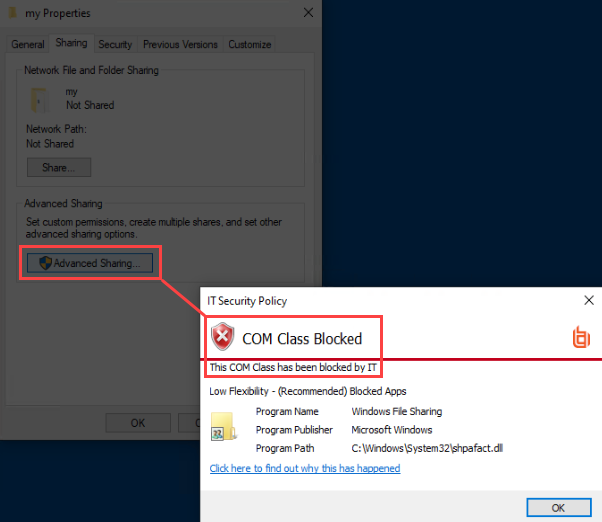
So is this possible? At least in this way, yes. However, I have not fully tested all of the impacts of blocking the “Sharing Elevated Virtual Factory”, so I would be hesitant to advise this as it may lead to unexpected behavior.
Another thing to note is that the GUI is only one method to enable Sharing on a directory. My above example does not block an Admin using PowerShell (for example) to accomplish the same thing:
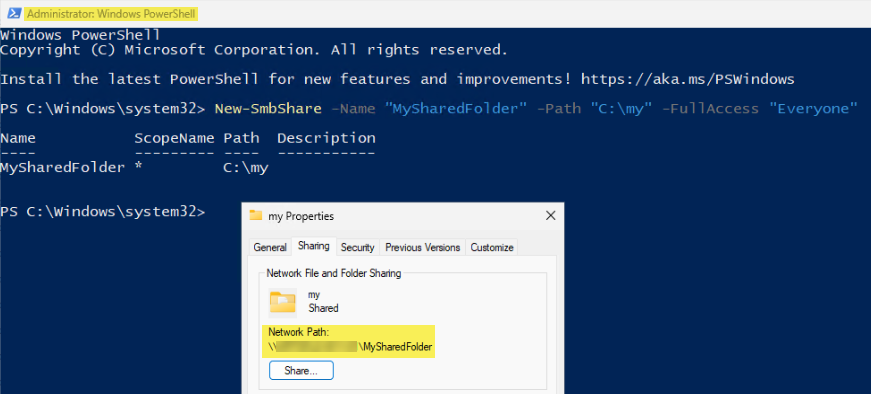
So you would need to consider all different avenues an Admin user may enable sharing on an otherwise unprotected directory.
No account yet? Create an account
Enter your E-mail address. We'll send you an e-mail with instructions to reset your password.