
Managing AI Application Control at Scale: A Situational Workstyle Approach in EPM for Windows
Hey BeeKeepers!
Welcome to another edition of suggesting AI EPM policy rules. This advice is geared at creating a separate AI Workstyle for the exact reason that the space is highly dynamic. This is an evolution from using the All Users workstyle for a global block, and then trying to navigate how to handle exceptions.
Note: This space is still highly dynamic! The initial notes in Hunting for Lobsters in EPM Analytics - Openclaw (Clawdbot, Moltbot) | Community still stand. The goal isn’t artisanal policies, or boiling the ocean to catch a few lobsters - they will mutate before being totally captured anyways.
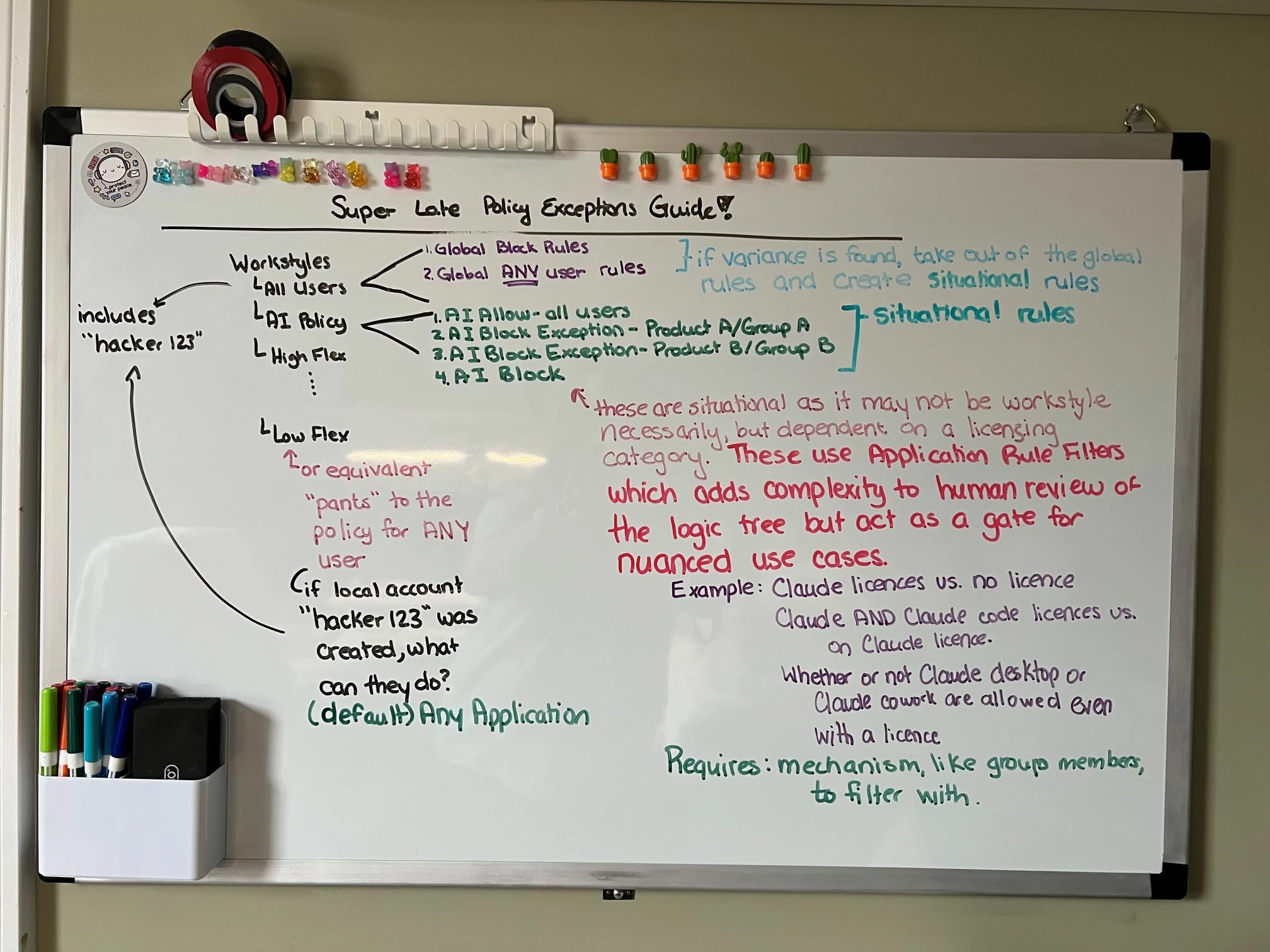
💡 There’s a whiteboard at the bottom of the post from my my analogue thinking to provide a visual of the logic.
TLDR
- Use an AI workstyle rule to allow for faster changes than typically seen in policy updates
- All Users - AI - bypass some unintended consequences of AI block rules, or AI that’s actually for all users
- Block Rule - the default block without any exception handling
- Block Exception Rule - name it, and use Application Rule Filters rather than workstyles
- This is one of the few use cases I recommend this approach over RBAC style workstyles
The AI Workstyle
The AI Workstyle acts as a means of logically collecting all the AI items together to provide the global blocks, global allow, and the nuances in between. This uses the Application Rule Filters that are typically considered advanced as they add complexity to the logic chain, but this is one of the use cases where they provide incredible value.
First Round Structure
The first round of the modifications typically start around tackling the exceptions to blocks. For this reason, I recommend having the separate policy as this is where you can start building without a concern later of causing an explosion in All Users.
Documentation: Workstyles | EPM-WM Cloud
First Round - Getting in the Block, and Exceptions
[top of rule list — global hard blocks first]
1. Global Block Chunks
→ Application Group: "Block - All Users"
2. Global Allow Chunks
→ Application Group: "Restricted- All Users"
→ Application Group: "Allow - All Users"
[AI-specific cluster — below global blocks, ordered top-down]
3. Allow — AI Exception (for approved users/groups)
→ Application Group: "Approved AI Tools"
→ Rule Filter: AD group "AI-Approved-Users"
4. Block — AI Tools (catch-all for everyone else)
→ Application Group: "Blocked AI Tools"
→ No rule filter — applies to all
Second Round
The second round comes in when there comes into questions around controlling specific products. For instance, if there is a permission set for Claude but only some people have Claude Code, this gives an opportunity to piggy-back off of those delineations into the policy directly.
Example use cases
- Claude approved for web, but not the desktop app for all users
- Different AIs are approved for specific application team members
Second Round - Start Adding Nuanced AI Exception Handling
[top of rule list — global hard blocks first]
1. Global Block Chunks
→ Application Group: "Block - All Users"
Block — Global prohibited (no exceptions ever, BT recommended)
2. Global Allow Chunks
→ Application Group: "Restricted- All Users"
→ Application Group: "Allow - All Users"
[AI-specific cluster — below global blocks, ordered top-down]
3. Allow — AI Exceptions with Nuanced
→ Application Group: "All Users - Approved AI Tools"
→ No rule filter — applies to all
→ Application Group: "Block Exception - AI Tool A"
→ Rule Filter: EntraID/AD group "AI-Approved-ToolA"
→ Application Group: "Block Exception - AI Tool B"
→ Rule Filter: EntraID/AD group "AI-Approved-ToolB"
4. Block — AI Tools (catch-all for everyone else)
→ Application Group: "Blocked AI Tools"
→ No rule filter — applies to all
Making This Less Chaotic
Along with the dynamic changes is also the need to maintain the policy. Suggestions of how to make this less like trying to corral chaotic pigeons, and instead just normal ones.
EPM Policy API:
Maintain (Default) Catch-Alls as Exception Handling
The (Default) catch alls (e.g. (Default) Any Applications ), is a good place to look for trending of new-to-your-org software that’s running, or things that no longer match your approves. I recommend monitoring the defaults for trends. Heuristically checking the Analytics and Reporting is an option, but trending and statistics is it’s own topic; the main item is ensure logs get to the SIEM for Defaults and work from there.
AI Disclaimer: To be perfectly clear, I’m not anti-AI. AI helped translate my lovely whiteboard drawing below into something people can actually follow along with - you’re welcome! 😉 Helped is the key here - AI built the language scaffolding after I set up my communication preferences and known gaps; I still own editing, accuracy, and accountability. Any mistakes are wholly human. I don’t need assistance with that part.