
Solved

Beyondtrust workfoce passwords

  • January 14, 2026
  • 7 replies
  • 102 views

Forum|alt.badge.img+2

Hello everyone!

We are facing a possible configuration issue, we believe.

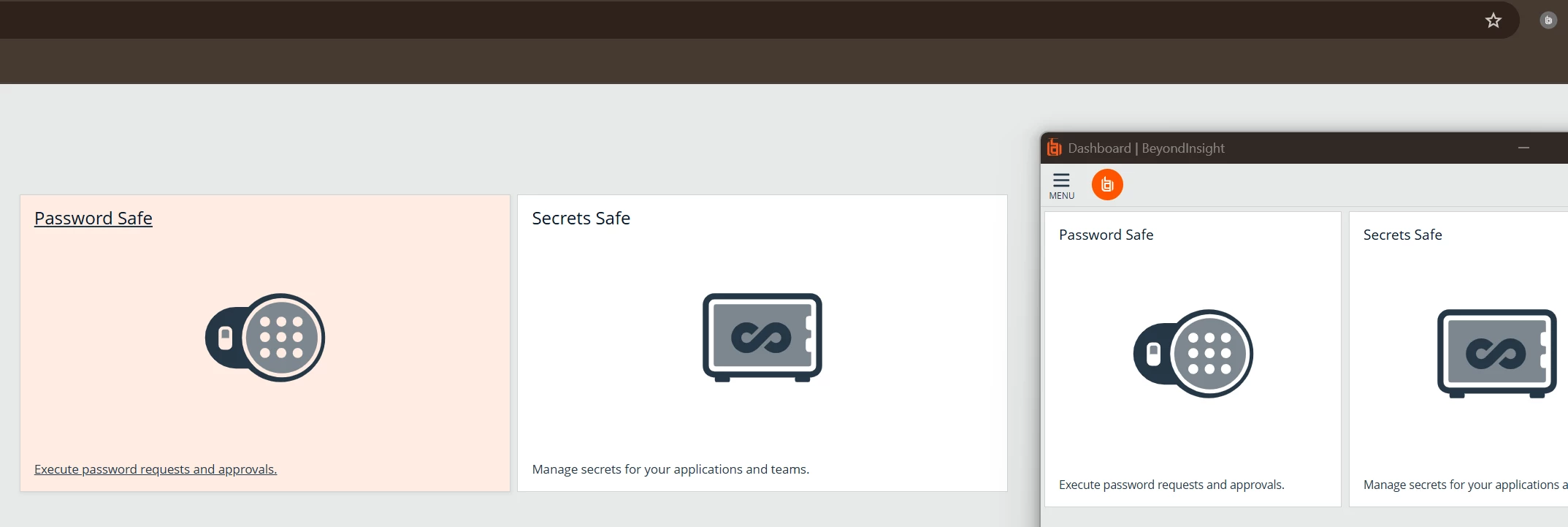
Is there any setting for using BeyondTrust Workforce Passwords in a fixed browser window? The problem is that every time we authenticate, a new browser window opens, causing us to lose visibility and usability. Has anyone else encountered this situation?

Thank you very much.


Best answer by GloriaB

Please open a case with BeyondTrust Support for this issue. 

7 replies

Pulitros144
Forum|alt.badge.img+4
  • Veteran
  • January 15, 2026

@Carlos Mendonça please take a look at KB0020839, i will attach the pdf so you can see better, but that is your resolution.

Please mark as best answer if helps.


Forum|alt.badge.img+2

@Pulitros144 


Hello Pulitros, how are you?
Thank you very much for sharing the documentation.
Following the instructions, the problem still persists for the user.
The feature only works with the console administrator user.
For other user profiles, it displays as shown in the screenshot.


Forum|alt.badge.img+2

Has anyone else encountered this same problem and found a solution, please?
I've already reinstalled and tried other browsers without success.


GloriaB
BeyondTrust Employee
  • BeyondTrust Employee
  • Answer
  • February 13, 2026

Please open a case with BeyondTrust Support for this issue. 


Forum|alt.badge.img+2

@GloriaB 


Hello Gloria, How are you? Thank you very much and I appreciate your guidance.

Ticket open.

Number CS1455744


GloriaB
BeyondTrust Employee
  • BeyondTrust Employee
  • February 26, 2026

Hi ​@Carlos Mendonça  Are you using a custom URL name?  


Forum|alt.badge.img+2

Hi ​@GloriaB ,

I managed to resolve the issue using the custom URL collected within the application.

It's the same URL used for the SAML connector.

Thank you very much, I appreciate your support.




