


Scatts
BeyondTrust Employee
September 23, 2024

You asked, we listened….Policy Difference: EPM Cloud 24.6

  • September 23, 2024
  • 17 replies
  • 892 views

You asked, we listened…. with over 200 votes in our Aha! Ideas portal, the most popular feature request for EPM, and it is here….Policy Difference.
 

Users will be able to compare policy revisions, pinpoint changes, track who made them and when, solving for auditing and streamlining policy troubleshooting use cases. This feature presents differences between two policy revisions in an easy-to-read, text-based format, allowing for enhanced control over policy management. Save time and gain full visibility into policy changes with our intuitive policy revision comparison tool, scheduled to be released in EPM Cloud 24.6. Here is a sneak preview:
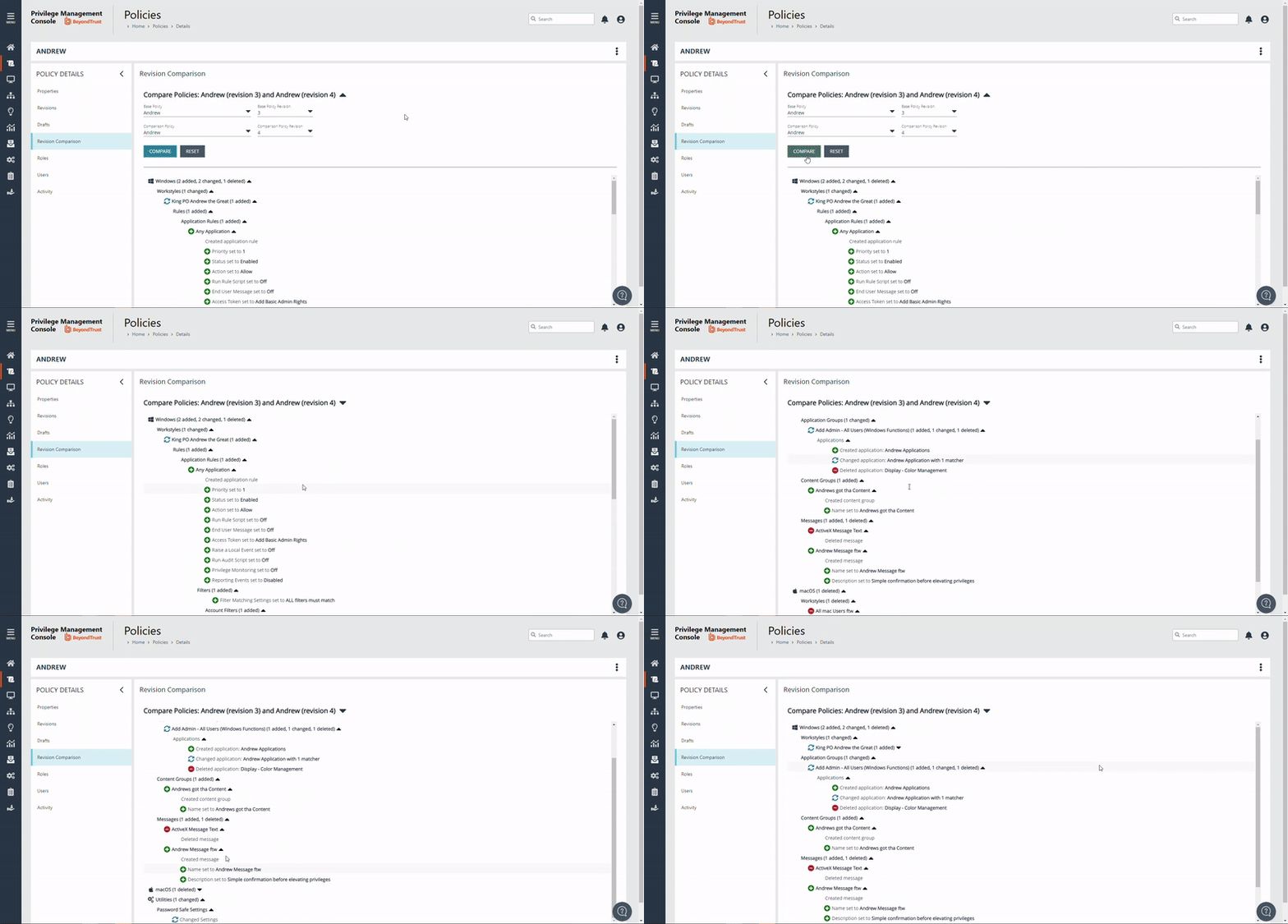


17 replies

Guru
November 1, 2024

Thanks it works, but would like more details for it.
Samples would be what is added to an Appgroup, could be just description instead of 3 changes has been done.


Then to compare it forces you to choose two different policies, before you can compare the same policy of revision 40 and 45.

I think out of the gate comparing the same policy and just different revision would be nice.

These change would be nice if embedded to the Annotation, it would help so much for documenting stuff for change requests.

Scatts
BeyondTrust Employee
ScattsAuthor
BeyondTrust Employee
November 1, 2024

Hey @Jens Hansen, thanks for the feedback! Just to confirm….when making a change to an application definition, you would like to see the matching criteria + the string/configured that has changed, within the Policy Difference?

To your point on having to select two different policies to compare, you can do this in the context of a single policy to avoid needing to do that. If you access the Policy comparison via Policies > View Policy Details via the Policy burger menu > Revision Comparison, the Base Policy and Comparison drop downs default to the same Policy aswell as the 2 most recent revisions:


Details of who created the revision and when can be found on Revisions


Similarly, if you are an Administrator role you can access the changes between policy revisions via Auditing Activity Auditing from any Audit Type = Create Revision via the audit log’s Activity Details in the burger menu and then selecting Revision Comparison (details of who created the revision and when can be found on Details):


Would either of these 2 routes help solve the change request use case?

Guru
November 1, 2024

Just to confirm….when making a change to an application definition, you would like to see the matching criteria + the string/configured that has changed, within the Policy Difference?


I think just the Apps added to an app group, I don’t think additional criteria is needed.

I would though still like to be taken to the option for policy comparison directly from the policy menu, then here choose policies and revisions to compare.

But really nice feature already.

Scatts
BeyondTrust Employee
ScattsAuthor
BeyondTrust Employee
November 1, 2024

Hey @Jens Hansen, we do show the apps added to an app group….see example below which includes application definitions added, changed and deleted within an application group:
 

Is this what you mean? Or are you seeing something different?
 

We appreciate the positive feedback, i’m glad to hear it. We will certainly take away the constructive feedback you have provided as well! 😊

Trailblazer
June 11, 2025

I love that we can compare different policies.  That’s awesome!

Unfortunately, I don’t think I quite understand what I’m looking at.  How do I know what is on the base policy and what is missing from the compared policy? 


The terms “created”, “changed”, and “deleted” don’t mean anything to me but I think this is what it means:


Created = on base but not on comparison

Changed = on base and comparison but different

Deleted = on comparison but not on base


Do I have that right?  If not, can you better define what those terms mean?

Trailblazer
June 16, 2025

@Scatts -- I know it’s an old post but I was wondering if you could answer the above question?

Scatts
BeyondTrust Employee
ScattsAuthor
BeyondTrust Employee
June 17, 2025

Hey ​@mlajoie, apologies for the delayed response! Hopefully the below definitions provide a better explanation:


Base Policy / Revision / Version - This is the initial policy and revision/draft used to form the reference point for the comparison.

Comparison Policy / Revision / Version - This is the policy and revision/draft selected to compare against the base.


Therefore…


Created = on COMPARISON but not on BASE

Changed = on BASE and COMPARISON, but different

Deleted = on BASE but not on COMPARISON


Please let me know if you need any additional info or if you have any feedback to share :)



